/What is automated code remediation?
Automated code remediation is the use of AI and rules-based tools to turn security findings from SAST, SCA, and other scanners into proposed code fixes, usually delivered as pull requests or IDE suggestions. Developers still review and merge each fix. It works best when findings are first validated as reachable and routed to the right code owner, so the fixes that get generated are ones that actually matter.
Your SAST tool flagged 3,000 issues. Your developers fixed 40 of them last sprint. Hiring won’t close that gap.
That’s why automated code remediation is getting so much attention. If AI can write the fix, developers only need to review it and click merge.
What is Automated Code Remediation?
Automated code remediation means using AI, rules-based transformations, or both to turn a security finding into a proposed code change. A scanner finds a SQL injection, and instead of a developer researching the fix from scratch, a tool writes the patch and opens a pull request or shows a suggestion in the IDE.
Humans are still in the loop. Every serious tool in this space expects a developer to review and approve the change. The goal isn’t fixing code without people. It’s taking the research and typing off their plate.
How Automated Code Remediation Works
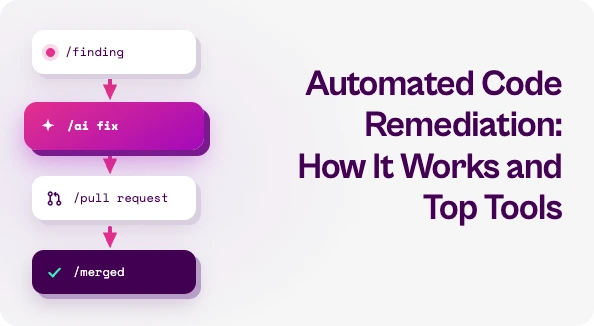
Most tools follow roughly the same pipeline:
Ingest the finding. From a SAST, SCA, or code quality scanner, either the vendor’s own or a third party’s through a format like SARIF.
Understand the context. Better tools check reachability first, so they don’t spend effort on code that never runs.
Generate the fix. Either with deterministic rules (known-safe transformations) or an LLM that’s given the surrounding code.
Deliver it. Usually as a pull request, sometimes as an IDE suggestion or a one-click fix inside the scanner’s own UI.
Review and merge. A developer checks the diff, runs tests, and ships it.
Where Automated Code Remediation Falls Short
Generating a patch is the easy part. The hard parts are everything around it.
- Too many findings, not enough signal. Auto-fixing a vulnerability nobody can reach just creates more PRs to review. Noise is still noise, even when it comes with a fix.
- Single-scanner tools. Many autofix features only work on their own vendor’s findings. Most enterprises run several AppSec tools, so each one ends up with its own fix workflow.
- Ownership. A fix PR that lands in the wrong repo or goes to the wrong team just sits there.
- Trust. LLM-generated fixes aren’t guaranteed to be correct or free of side effects. If developers get burned a few times, they stop merging.
- Not every fix is a code change. Sometimes the fastest way to reduce risk is a config change or a compensating control while the real fix gets scheduled.
Best Automated Code Remediation Tools for 2026
There’s no single best tool here. It depends on which scanners you run and where your developers work.
Best for teams on GitHub and CodeQL: GitHub Copilot Autofix. Generates fixes for CodeQL alerts and opens pull requests, including changes across multiple files when needed. It’s now in limited public preview for Azure DevOps too.
Best for SonarQube shops: Sonar AI CodeFix. Built into SonarQube, it suggests fixes for vulnerabilities as well as bugs and code smells. Fixes show up in the IDE, the SonarQube UI, and pull requests.
Best for reachability-first fixing: Semgrep Autofix. Went into public beta in March 2026. It runs codebase-aware reachability analysis before generating patches, then sends that context to LLMs to write fixes in pull requests.
Best for Snyk users: Snyk. AI-generated fixes for issues Snyk Code finds, plus dependency upgrade PRs for open source vulnerabilities.
Best for Veracode customers: Veracode Fix. AI-generated patches for Veracode findings, with developers reviewing each suggestion.
Best for fixing across multiple scanners: Pixee. Takes in findings from different scanners and delivers pull requests, using a mix of deterministic codemods and AI-generated fixes.
Best for fixing inside the IDE: Mobb. Works with findings from several SAST tools and brings fixes into the developer’s editor.
Best for large-scale code migrations: Moderne. Built on OpenRewrite for framework upgrades and migrations across many repositories. It solves a slightly different problem than fixing individual vulnerabilities, but it’s useful when the fix is “upgrade everything.”
Best for orchestrating remediation across your whole AppSec stack: Seemplicity. Seemplicity doesn’t write the patch. It makes sure the right fixes happen. It pulls in findings from your SAST, SCA, DAST, and other AppSec tools, and its Code Analyst reads your repositories to check whether the vulnerable code can actually be reached. It then groups findings by root cause, identifies the right developer owner, and sends fix-ready tasks into Jira and the other tools your teams already use. When a full code fix isn’t practical yet, Response Options suggests alternatives like configuration changes or compensating controls.
How to Pick the Right Approach
Start with the tools you already have. If you’re all-in on one scanner, its native autofix is the easiest win. If you run several AppSec tools, look at something that works across all of them.
Then ask the questions that decide whether fixes actually get merged:
- Does it filter out unreachable findings before generating fixes?
- Where do the fixes show up, and is that where your developers already work?
- How does each fix get to the right owner?
- Can you track whether the fix actually closed the finding?
Automated code remediation can take a lot of manual work off your developers. It pays off when the fixes go after real risk and land with the right developer.
If you want to see how that works across your AppSec stack, take a look at Seemplicity.

Stay updated on Seemplicity blog
Subscribe today to stay informed and get regular updates from Seemplicity.