/What is application security monitoring?
Application security monitoring is the continuous observation of an application’s behavior, traffic and execution in production to detect attacks and exploitable weaknesses as they happen. It covers what pre-release testing can’t: newly disclosed vulnerabilities in shipped code, production-only conditions, and abuse of APIs and business logic. Effective monitoring tracks exploit attempts, API abuse, vulnerable code that’s actually running and behavioral deviations, then correlates those signals with code, cloud and identity context so the right fixes reach the right owners fast.
Most application security effort happens before release. Code gets scanned, dependencies get checked, and apps get tested before they ship. But once an application is live, it faces real users, real traffic and real attackers, and that’s where much of the risk actually shows up.
Application security monitoring covers that gap. Here’s what it is, what to watch, and how to make sure what you detect actually gets fixed.
What Is Application Security Monitoring?
Application security monitoring is the continuous observation of an application’s behavior, traffic and execution in production, with the goal of detecting attacks and exploitable weaknesses as they happen. Instead of asking whether code could be vulnerable, it asks what the application is actually doing right now, and whether any of it looks like an attack.
It’s often confused with two neighboring disciplines:
- Application performance monitoring (APM) uses similar instrumentation but tracks latency, errors and uptime. Its goal is a healthy app, not a secure one.
- Application security posture management (ASPM) aggregates findings from across the development lifecycle into a unified view of posture. Runtime monitoring is one of the inputs ASPM can draw on, but it’s a different job.
Why Pre-Release Testing Isn’t Enough
Static analysis, software composition analysis and dynamic testing are essential, but they assess an application at a point in time, usually in an environment that doesn’t fully match production. Several things happen after release that testing can’t account for:
- New vulnerabilities emerge in code that has already shipped. A library that passed every check last month can have a critical CVE disclosed tomorrow.
- Production behaves differently. Real configurations, data, integrations and traffic patterns create conditions that test environments rarely reproduce.
- Attackers target logic, not just flaws. Business logic abuse, API misuse and manipulation of service-to-service flows often don’t register as vulnerabilities in a scanner at all.
Testing tells you an app is safe enough to release. Monitoring tells you whether it’s still safe now.
What to Monitor
Effective monitoring focuses on signals that indicate active risk, not just activity:
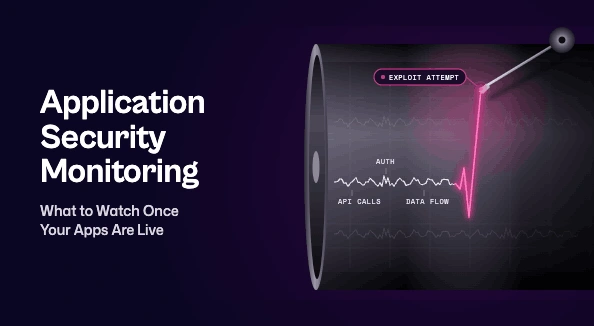
- Exploit attempts. Injection, deserialization, path traversal and other attack patterns aimed at known application vulnerabilities.
- API abuse. Unusual call sequences, spikes in authentication failures, credential stuffing and requests that don’t match expected usage.
- Vulnerable code that’s actually running. Which libraries and functions with known flaws are loaded and executed in production, as opposed to sitting unused in a dependency tree.
- Behavioral deviations. Unexpected data flows, privilege changes, outbound connections or service calls that break from an application’s normal pattern.
- Logs and audit trails. Authentication events, access to sensitive data and configuration changes that provide context during an investigation.
Common Approaches and Tools
Most organizations combine several layers rather than relying on one tool:
- Web application firewalls (WAFs) inspect traffic at the edge and block known attack patterns before they reach the app.
- Runtime application self-protection (RASP) runs inside the application and can detect and block attacks with full execution context.
- Application detection and response (ADR) learns how an application normally behaves and flags deviations, which catches attacks that signature-based tools miss.
- Runtime vulnerability analytics identifies which vulnerable components are actually in use, separating real risk from theoretical risk.
- SIEM integration sends application events to the SOC so they can be correlated with endpoint, network and cloud data.
Each layer sees something the others don’t, so coverage usually comes from the combination.
Application Security Monitoring Best Practices
Define normal first. Behavioral detection only works against a baseline. Understand each application’s expected traffic, flows and access patterns before tuning alerts.
Cover your whole portfolio. Gaps in language, framework or environment coverage become blind spots. Revisit coverage as new applications and services ship.
Correlate, don’t isolate. A runtime alert means more alongside code, cloud and identity context. A detection on an internet-facing service running a library listed among known exploited vulnerabilities is a very different priority from the same alert on an internal test tool.
Tune continuously. Untuned monitoring floods teams with alerts they learn to ignore. Review false positives regularly and refine thresholds after each release.
Close the loop with developers. Alerts alone don’t reduce risk. Findings that point to a code or configuration issue need to reach the owning team as a clear, actionable fix, which is where mature DevSecOps practices pay off.
How Seemplicity Fits In
Application security monitoring produces valuable signals, but on its own it adds another stream of findings to manage. Seemplicity brings runtime detections into the same view as code, cloud and identity findings. There, they’re deduplicated, correlated with everything else known about the affected asset, and routed to the right owner, with SLAs tracked through to closure.
Runtime evidence also sharpens prioritization. Seemplicity’s AI Analysts weigh what an application is actually doing in production, not just what it could theoretically be vulnerable to, so the fixes that matter most get done first.
Keeping Watch After Go-Live
Release isn’t the finish line for application security. New vulnerabilities, shifting traffic and attackers working the gaps between services mean an application’s risk keeps moving after it ships. Application security monitoring gives teams visibility into that risk as it happens, and it pays off when those detections are connected to the wider security picture and turned into fixes rather than another backlog.

Stay updated on Seemplicity blog
Subscribe today to stay informed and get regular updates from Seemplicity.