/What Are the Steps in the Vulnerability Scanning Process?
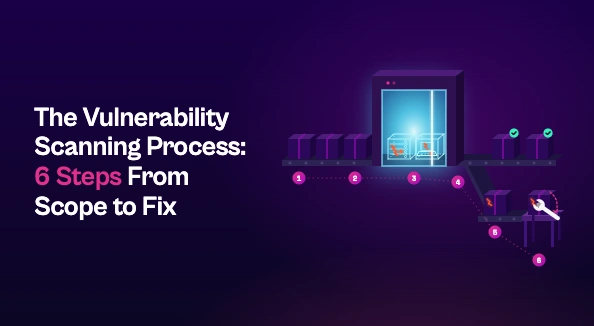
The vulnerability scanning process has six steps: define scope and objectives, inventory your assets, choose and configure scanners, run scans on a regular cadence, prioritize findings by real risk, and remediate and rescan to verify fixes. Scanning itself is rarely the hard part. Most programs stall after the scan, when duplicate findings, unclear ownership, and manual triage slow remediation down.
Running a scanner is easy. Running a vulnerability scanning process that consistently turns findings into fixes is harder. Most teams don’t struggle to find vulnerabilities; they struggle with the volume, accuracy, and follow-through that come after.
This guide walks through the six steps of an effective vulnerability scanning process, from defining scope to verifying fixes.
What Is the Vulnerability Scanning Process?
The vulnerability scanning process is the repeatable workflow organizations use to automatically identify known security weaknesses across their assets: missing patches, misconfigurations, outdated software, and exposed services. Scanners compare what they find against databases of known vulnerabilities, such as CVEs, and report the results.
Scanning is the detection engine of the vulnerability management lifecycle. It’s also distinct from two practices it’s often confused with:
- Vulnerability assessment goes further, analyzing scan results in context to judge actual risk.
- Penetration testing uses human testers to actively exploit weaknesses, typically less often and with a narrower scope.
Frameworks like PCI DSS and NIST CSF treat regular scanning as a baseline control, so it’s rarely optional.
Step 1: Define Scope and Objectives
Every scan should start with a clear answer to two questions: what are you looking for, and where?
Objectives might include finding missing patches, checking configurations against hardening baselines, or confirming that last quarter’s fixes held. Then set boundaries: which environments, IP ranges, cloud accounts, and applications are in scope, and which business-critical systems need special handling.
This is also where you decide between external scans, which show what an attacker sees from the internet, and internal vulnerability scanning, which reveals what an attacker could reach once inside. Most organizations need both.
Finally, agree on scan windows with IT and application owners. Intensive scans can slow production systems, and surprises erode the trust you’ll need later when asking those same teams to fix things.
Step 2: Discover and Inventory Assets
You can’t scan what you don’t know exists. Shadow IT, short-lived cloud resources, and forgotten test environments are exactly where unpatched vulnerabilities hide.
Build your target list from an up-to-date asset inventory, combining discovery scans with sources like your CMDB, cloud provider APIs, and endpoint management tools. Many scanners can run discovery automatically, but cross-reference multiple sources rather than relying on one.
While you’re at it, tag each asset with its business criticality and its owner. Both will matter in Steps 5 and 6.
Step 3: Choose and Configure Scanners
No single scanner covers everything, so match tools to asset types:
- A network vulnerability scanner for servers, endpoints, and network devices
- Web application scanners (DAST) for running apps and APIs
- Cloud and container scanners for cloud configurations, images, and workloads
- SAST and SCA tools for source code and open-source dependencies
Configuration matters as much as tool choice. Authenticated scans log in with credentials and can see installed software, patch levels, and local settings. Unauthenticated scans only see what’s exposed from the outside. Authenticated scans are far more accurate, so use them wherever possible.
Tune your scan policies too. Excluding irrelevant checks and setting appropriate intensity cuts noise and false positives before they ever reach your queue.
Step 4: Run the Scans
During a scan, the tool typically:
- Probes targets to identify live hosts, open ports, and running services
- Fingerprints operating systems, software, and versions
- Matches those against vulnerability databases to flag known weaknesses
- Records each finding with its severity, evidence, and affected asset
Cadence is where many programs fall short. Quarterly scans leave long gaps in which new CVEs and new assets go unchecked. A reasonable baseline is monthly scanning for most assets, weekly or continuous scanning for critical and internet-facing ones, and an extra scan after any significant change or major vulnerability disclosure.
Mature teams move toward continuous vulnerability management, where scanning runs constantly rather than as a periodic event.
Step 5: Analyze and Prioritize Findings
A single scan can return thousands of findings, many duplicated across tools or describing the same underlying issue. Treating them all as urgent guarantees that nothing important gets fixed fast.
Effective vulnerability prioritization looks beyond CVSS severity to factors like:
- Exploitability: Is there a known exploit, or is the CVE on CISA’s KEV list?
- Exposure: Is the asset internet-facing or otherwise reachable by an attacker?
- Asset criticality: What’s the business impact if it’s compromised?
- Compensating controls: Is the risk already mitigated elsewhere?
Validate findings before passing them on. False positives that reach engineering teams cost time and credibility.
Step 6: Report, Remediate, and Rescan
Scanning only reduces risk when findings get fixed. Turn prioritized findings into a remediation plan that routes each issue to the team that owns the affected asset, with clear fix instructions and an SLA based on risk.
Reports should serve two audiences. Technical teams need specific, actionable tickets. Leadership needs trends like mean time to remediate and SLA compliance.
Then rescan. Verification confirms the fix actually worked, closes the loop, and feeds directly into the next scanning cycle.
Where the Vulnerability Scanning Process Breaks Down
For most teams, scanning itself isn’t the problem. Modern scanners are good at finding vulnerabilities. The process breaks down afterward:
- Tool sprawl: Findings live in separate consoles with different formats and severity scales.
- Duplicates: Multiple tools report the same issue, inflating the backlog.
- Unclear ownership: Security knows what’s broken but not who should fix it.
- Manual triage: Analysts spend hours sorting, enriching, and routing findings by hand.
The result is a growing backlog and a widening gap between what’s detected and what actually gets fixed.
How Seemplicity Fits In
Seemplicity picks up where scanners leave off. It aggregates and deduplicates findings from all your scanning tools into a single, normalized view. AI Analysts then automate triage, assessing exploitability and business context to surface what actually matters.
From there, Seemplicity identifies the right owner for each fix, routes work into the tools teams already use, and tracks remediation through to verified closure. Your scanners keep finding vulnerabilities. Seemplicity makes sure they get fixed.
From Scan Results to Real Risk Reduction
A strong vulnerability scanning process isn’t a one-off scan. It’s a repeatable cycle: scope, discover, configure, scan, prioritize, fix, and verify. Get the early steps right and you’ll find more of what matters. Get the later steps right and you’ll actually reduce risk.

Stay updated on Seemplicity blog
Subscribe today to stay informed and get regular updates from Seemplicity.